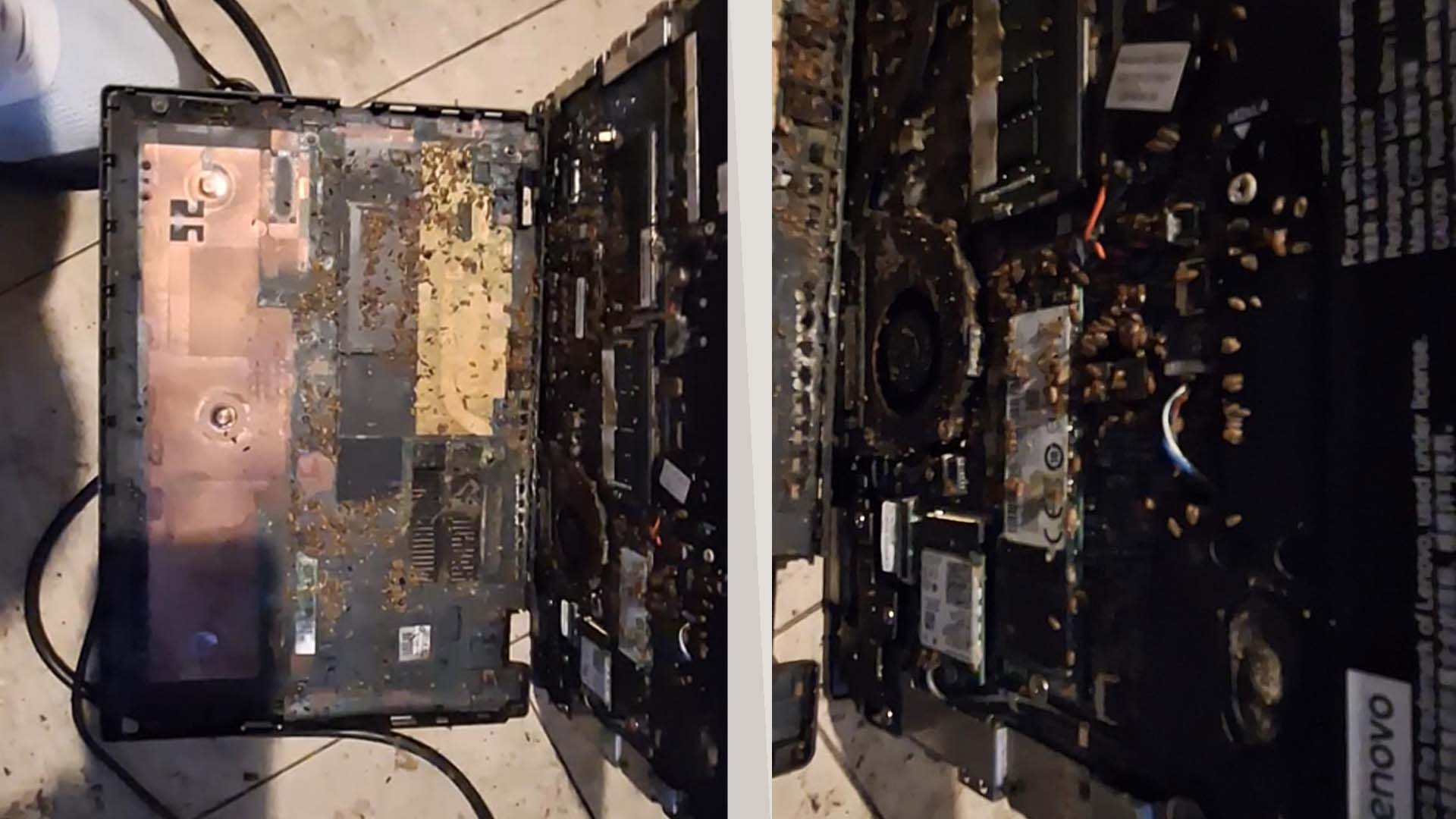
A Cheap Refurbished Laptop Turned Into a Costly Lesson After Bugs Were Found Inside
Buying a refurbished laptop can be a smart way to save money, especially when prices for computer parts and memory remain high. For many shoppers, a used or refurbished notebook offers solid performance at a much lower price than buying new. But one recent case shows why every second-hand device should be inspected carefully before it is trusted as a daily machine.
A laptop buyer reportedly picked up a refurbished Lenovo notebook from what was believed to be a reputable seller. At first, it seemed like a great bargain. The laptop was purchased cheaply and then left unused in a drawer for around one or two months. Unfortunately, when the device was finally needed, it stopped working.
After opening the laptop to investigate the failure, the owner discovered something far worse than a simple hardware fault. The inside of the machine was filled with debris that appeared to be related to insects. The contamination was visible around key internal components, including the motherboard, cooling fan, memory area, wireless card, and even the inside of the bottom cover.
The discovery raised serious questions about how thoroughly the laptop had been checked before being sold as refurbished. A proper refurbishment process should usually include internal inspection, cleaning, testing, and basic repair verification. Technicians often remove the bottom panel to look for dust buildup, liquid damage, corrosion, damaged parts, or careless previous repair work. In this case, the internal condition suggests that either the inspection was not done properly or the problem developed after the purchase.
There is also a possibility that the infestation happened while the laptop was stored. A drawer can be dark, enclosed, and relatively warm, which may create a suitable hiding place for pests. If the laptop was left untouched for weeks, insects may have found their way inside through ventilation openings or small gaps in the chassis. Still, whether the issue began before or after purchase, the situation highlights an important point: refurbished and used laptops should never be left unchecked.
For anyone planning to buy a refurbished laptop, this story is a reminder to inspect the device as soon as it arrives. Check the exterior for signs of damage, unusual smells, loose panels, missing screws, or residue around ports and vents. If you are comfortable doing so, remove the bottom cover and inspect the internals for dust, corrosion, debris, pests, battery swelling, and signs of poor repair work. If you are not confident opening a laptop, take it to a repair technician for a quick inspection.
It is also wise to test the laptop immediately. Run the system for a few hours, check temperatures, listen for unusual fan noise, test the keyboard and trackpad, confirm that Wi-Fi and Bluetooth work, and make sure the battery charges correctly. Storage health, memory stability, and screen condition should also be checked before the return window closes.
The biggest mistake in this case may have been waiting too long before examining and testing the machine. If a refurbished laptop sits unused for months, the buyer may lose the chance to return it or prove that the issue existed before purchase. Even a great discount is not worth much if the device fails shortly afterward.
Refurbished laptops can still be excellent value, but only when purchased carefully. Buyers should choose sellers with clear return policies, warranty coverage, and transparent refurbishment standards. A low price can be tempting, but a proper inspection can prevent a bargain from becoming an expensive repair job.
This incident is an uncomfortable reminder that used electronics can hide serious surprises. Before trusting a refurbished laptop, look inside, test everything, and act quickly if something seems wrong. A few minutes of inspection could save you from a much bigger problem later.