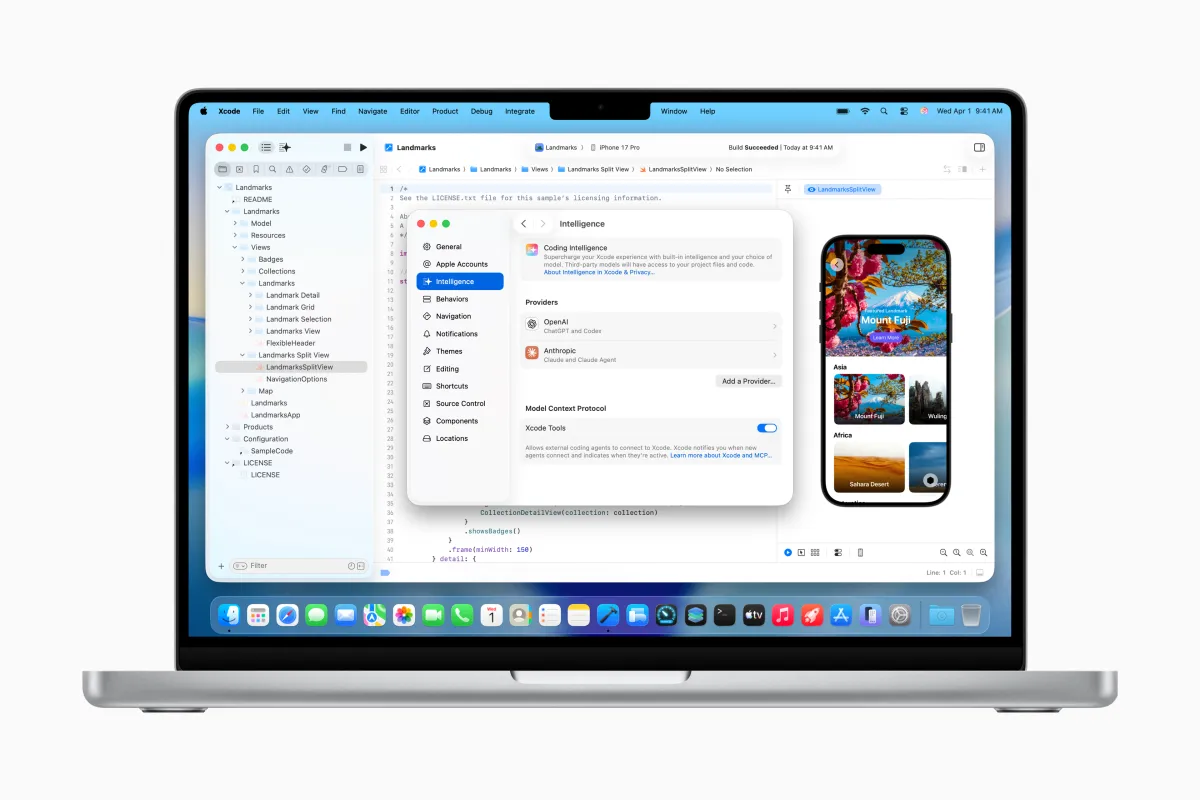
Apple is taking a major step forward in AI-powered app development by bringing true agentic coding to Xcode. The company has announced Xcode 26.3, an update that lets developers use agent-style AI tools such as Anthropic’s Claude Agent and OpenAI’s Codex directly inside Apple’s official development environment.
The Xcode 26.3 Release Candidate is available now to Apple Developers through Apple’s developer site, with the App Store release arriving a little later.
This move builds on last year’s Xcode 26 upgrade, which added support for AI assistants like ChatGPT and Claude inside the IDE used to create apps for iPhone, iPad, Mac, Apple Watch, and other Apple platforms. The big difference with Xcode 26.3 is that these new agentic tools aren’t limited to answering questions or generating snippets. They can interact with more of Xcode’s capabilities to handle deeper automation and more complex development workflows.
With agentic coding enabled, the AI models can tap into Apple’s latest developer documentation, helping them stay aligned with current APIs and recommended best practices while they work. At launch, the agents can do things like examine your project, understand its structure and metadata, compile builds, run tests, detect errors, and attempt fixes—essentially acting more like a smart, tool-using coding partner rather than a simple chat interface.
Apple says it collaborated closely with Anthropic and OpenAI to shape the experience. Part of that effort focused on optimizing token usage and tool calling so the agents can run efficiently within Xcode without wasting resources.
Under the hood, Xcode uses MCP (Model Context Protocol) to expose Xcode features to AI agents and connect them with development tools. This matters because it means Xcode isn’t locked into only a couple of AI providers. In practice, Xcode can work with any external MCP-compatible agent for tasks such as project discovery, making changes, managing files, generating previews and snippets, and pulling up the most current documentation.
Getting started is designed to be straightforward. Developers can download the agents they want from Xcode’s settings, then connect to AI providers by signing in or adding an API key. Inside Xcode, a drop-down menu lets developers pick the model version they want to run—useful for choosing between a more capable model and a lighter, faster option depending on the task.
The workflow is centered around a prompt box on the left side of the screen. Developers can describe what they want in natural language, whether that’s building a new project, altering an existing feature, or adding functionality that relies on an Apple framework—along with how the feature should look and behave.
As the agent works, it breaks the job into smaller steps so developers can follow along. It also looks up the documentation it needs before writing code, helping reduce guesswork and outdated API usage. Code edits are highlighted directly in the editor, and a transcript view shows the actions the agent took, making it easier to understand what changed and why.
Apple believes this level of transparency could be especially helpful for newer developers who are still learning how projects are structured and how changes ripple through a codebase. To support that learning curve, Apple is also hosting a live “code-along” workshop on its developer site, giving developers a chance to watch agentic coding in action and follow along with their own copy of Xcode.
After generating code, the agent verifies its work by running tests to confirm everything behaves as expected. If something fails, it can iterate and refine the solution to address errors or other issues. Apple also notes that prompting the agent to think through its plan before it starts coding can improve results by encouraging a more deliberate approach.
And if the AI’s changes aren’t what you wanted, Xcode makes it easy to roll back. The IDE creates milestones each time the agent modifies the project, allowing developers to revert to an earlier state at any point.
Overall, Xcode 26.3 positions Apple’s development tools for a new era of AI-assisted programming—one where developers can delegate real build-and-test work to agents, keep changes visible and understandable, and stay in control of every step.


