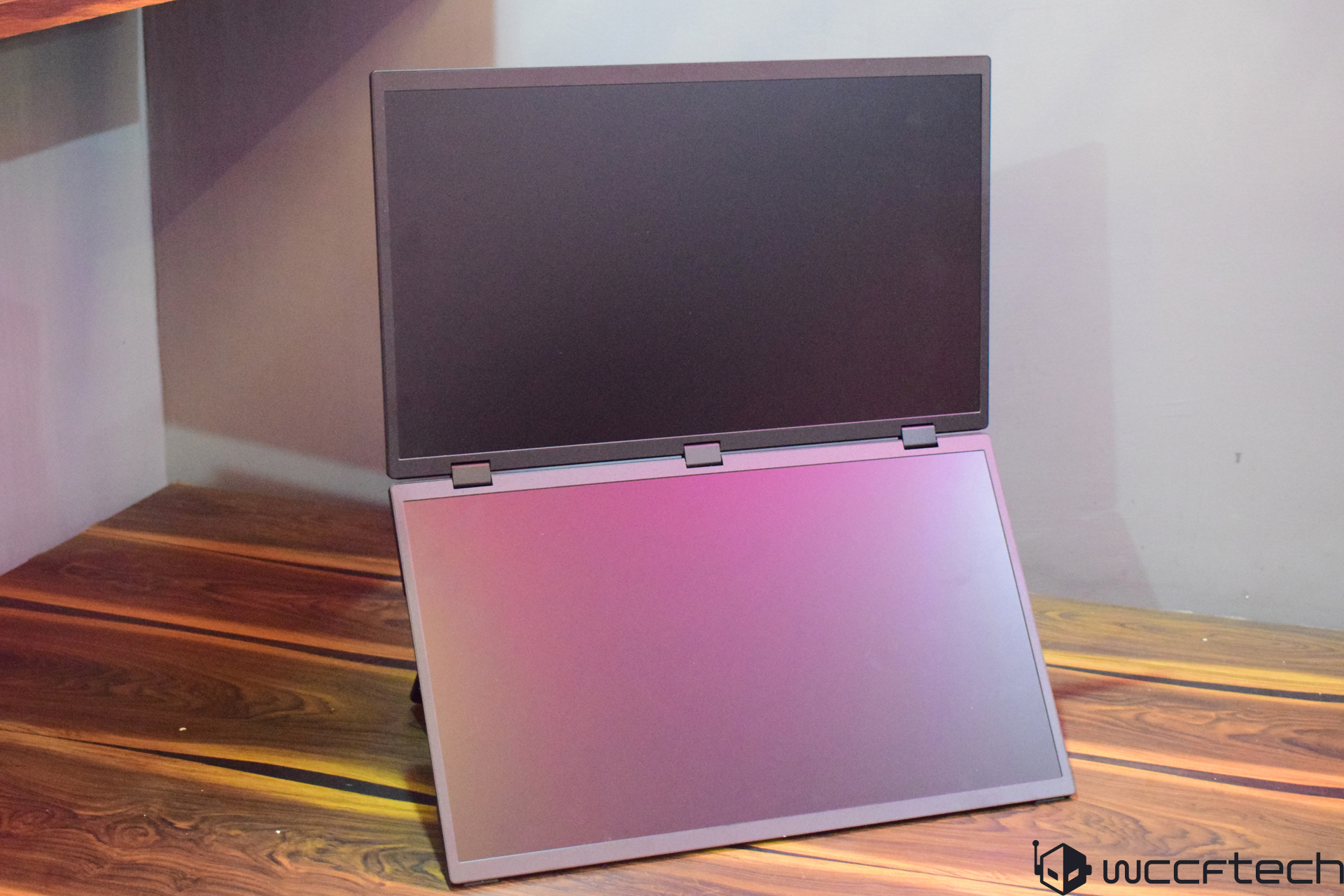
Laptops have always been favored for their portability, but the advent of mini-PCs has revolutionized the idea of compact computing. Today, mini-PCs can be so tiny that they easily fit into a loose pocket, negating the need for large motherboards to house modern hardware. While these devices are incredibly portable, they do require a separate display. The market has responded with innovative solutions, including portable dual-display setups that enhance productivity.
One such innovative solution comes from Uperfect, a well-known name in the portable monitor market. Their latest offering, the UStation Delta Max, promises advanced features and specifications suited for contemporary needs. This review delves into the performance, design, and functionality of the Delta Max to determine its value proposition.
The Uperfect UStation Delta Max arrives in a robust box with thick foam packaging to ensure the monitor’s safety during transit. The packaging includes the following items:
– Delta Max dual monitor setup
– 2x HDMI to Mini-HDMI cables
– 2x USB Type C cables
– 45W Adapter/Charger
– User Manual
The user manual provides basic setup instructions but lacks detailed guidance on using the monitor’s full range of features. Though not a major setback, additional detail would have been beneficial. The inclusion of high-quality cables and a 45W Adapter capable of powering the monitor and charging devices is a commendable touch.
Here’s a snapshot of the UStation Delta Max specifications:
Build quality is a significant aspect of the Delta Max, featuring an aluminum casing that adds to its durability. The monitors feel robust and well-constructed, making the overall weight approximately 2.36 kg, comparable to a standard laptop. The setup includes a sturdy stand ensuring stability and versatility, allowing configurations such as flat-table alignment or a 2-in-1 arrangement. It also supports wall mounting with four 75x75mm holes.
Connectivity is a strong suit of the Delta Max, predominantly located on the bottom screen to minimize cable clutter. Ports include 2x Mini HDMI and 3x USB Type C ports, with one designated for 45W power input and the others for audio and video. Controlling both monitors is convenient, as all display properties can be adjusted from the bottom screen.
Both screens, equipped with IPS panels, offer an 18.5″ size and 100% sRGB color gamut, making them suitable for both content consumption and creation. While 100% sRGB is not the industry standard for professional color work, it is more than adequate for general use. These displays can be overclocked to a 120Hz refresh rate under specific conditions, providing smooth visuals.
Setting up and using the Delta Max for the first time may be somewhat confusing, especially for those unfamiliar with stacked monitor configurations. Display output is simpler to manage than setting up different modes on each display. If connecting to a graphics card, additional configuration may be required through the control panel. For optimal performance, use the included power adapter, though the monitors can also be powered via USB ports.
The Delta Max offers several modes to suit different workflows:
– Link Mode: Combines both panels into a single display.
– Clone Mode: Mirrors the same content on both panels.
– StandAlone Mode: Treats each panel as an independent monitor.
These modes cater to various needs, from enhanced productivity to collaborative work. Link Mode, in particular, allows for seamless item movement across displays, although maximizing windows requires manual adjustment.
In summary, the Uperfect UStation Delta Max is a robust, versatile dual-display solution that caters to modern computing needs. Its build quality, range of connectivity options, and flexible display modes make it an appealing choice for those seeking enhanced productivity and portability.The experience of using the Delta Max monitors at close to their full size on each display had its challenges. One notable issue was watching YouTube videos. Since many videos are formatted in a 16:9 aspect ratio, displaying them on the monitors’ 9:16 aspect ratio in Link mode was less than ideal, as there was no way to fully maximize the video on one monitor. Theater mode became the go-to solution. However, the workflow with these monitors was smoother compared to configuring everything through the NVIDIA Control Panel. The monitors allowed easy dragging of app windows between the top and bottom displays without forcing a full-sized window mode aggressively.
Regarding connectivity, powering the monitors through a standard USB-C connection presents some intriguing possibilities. When connected to a power adapter, they perform as expected, similar to other portable monitors with a single display. Interestingly, both monitors can be powered by one or two connections from your device, eliminating the need for the power adapter and adding convenience, especially for travel. However, this setup comes with caveats that could impact user experience but won’t affect the overall assessment of the monitors.
Various monitor modes like Link, Clone, and Standalone function correctly with these USB-C connections, though some issues arise. For instance, increasing the brightness of either monitor above 50% causes both screens to turn on and off rapidly due to insufficient power. Additionally, playing media files with audio triggers the same issue. Despite this, using two regular USB connections rather than one seemed to resolve these power-related problems, maintaining stable displays even at high brightness and volume levels.
Achieving higher refresh rates is possible with the Delta Max monitors. Each display can support up to a 120Hz refresh rate through GPU configuration. However, when both displays are active in Link or Clone modes, the refresh rate caps at 60Hz. Through StandAlone mode, it’s possible to run either or both panels at 120Hz, offering smoother visuals suitable for gaming.
The Delta Max includes dual built-in speakers, each rated at 1W. As with many portable monitors, the audio quality is subpar, making these speakers unsuitable for serious use. The absence of a 3.5mm audio jack compounds this issue, so using a headset or external speakers is strongly recommended.
In summary, the UPERFECT UStation Delta Max stands out as an excellent portable monitor. Its versatile adjustments, large screen size, and thin build make it a great choice for those on the go. Although it is slightly heavier than most portable monitors, it remains portable, much like a gaming laptop. The build quality is commendable, with no flimsy parts. Both displays offer a 1080p resolution and can reach a refresh rate of 120Hz, making them suitable for solo or multiplayer gaming without needing additional monitors. The Link mode enhances productivity, and the ability to power both screens with a single USB-C connection is a significant advantage. Despite the lack of decent speakers and a 3.5mm jack, these shortcomings are minor compared to the monitor’s overall benefits.
Price is an essential consideration, with similar dual monitor setups often exceeding $500. The UPERFECT UStation Delta Max, available for $499.99 with free worldwide delivery and a 2-year warranty, presents a compelling option. However, opting for the smaller and less expensive 15.6″ version involves certain trade-offs.
**Pros:**
– Versatile adjustability and a 2-in-1 setup
– High visual quality and viewing angles
– Supports up to 120Hz refresh rate
– Great color accuracy and brightness
– Can be powered via a single USB-C connection
– Multiple high-quality cables included
– Various modes for work and gaming
– Simultaneous operation with two devices
– Durable build quality
**Cons:**
– Lackluster speakers
– No 3.5mm audio jack
– Occasional issues with regular USB-C connection