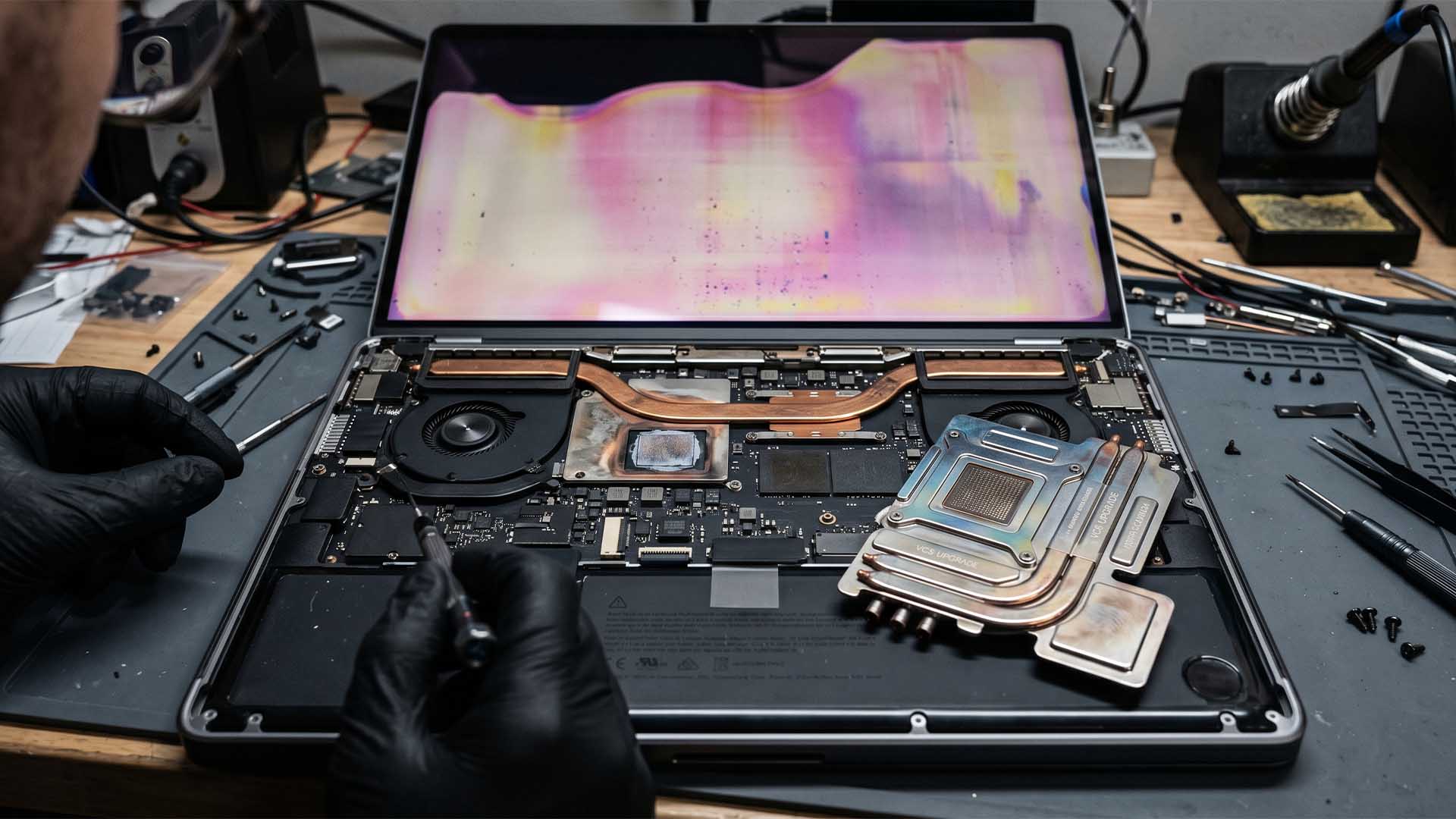
Apple’s M5 Max MacBook Pro may be pushing its cooling system to the limit, as one owner claims that heavy workloads caused faint discoloration on the lower part of the display. The report has sparked fresh discussion about whether Apple’s current MacBook Pro thermal design is still enough for its most powerful Apple Silicon chips.
According to the user, the issue appeared after running demanding tasks such as local LLM hosting. After only a few minutes at full load, the fans reportedly ramped up to maximum speed, and two faint discolored areas became visible on the lower section of the screen, directly above the fan outlets.
That detail is important because the affected portion of the display lines up with the area where hot air exits the MacBook Pro chassis. In normal use, the screen should not be affected by exhaust heat when the lid is open. However, the owner claims the discoloration appears whether the display is opened at around 90 degrees or fully extended.
Display discoloration can occur when a panel is exposed to excessive heat for an extended period. This is more commonly associated with situations where a laptop is running under heavy load while the lid is closed, though the user did not say that was the case here. Still, the location of the marks suggests heat may be involved.
The M5 Max is built for serious performance, especially in CPU-heavy, GPU-heavy, and AI-related workloads. Apple’s newer chip layout is designed to improve efficiency and thermal behavior, but sustained tasks can still push temperatures very high. Reports suggest the chip can reach temperatures above 100 degrees Celsius under extreme load, which is a serious challenge for any thin laptop design.
The current MacBook Pro cooling system relies on a heat pipe and dual low-profile fans. That setup is effective for short bursts of performance, such as exporting files, compiling code, or handling brief creative workloads. But continuous full-load tasks like local AI model hosting, rendering, or long compute sessions can produce much more heat over time.
This is where the debate around vapor chamber cooling becomes more relevant. A vapor chamber can spread heat more evenly across a larger surface area, helping prevent hot spots and allowing fans to remove heat more efficiently. For high-performance laptops, especially ones using increasingly powerful Apple Silicon chips, this type of cooling design may become necessary rather than optional.
At the moment, this appears to be an isolated report rather than a widespread MacBook Pro defect. A single case may not be enough to trigger an investigation or design change from Apple. However, it does highlight a growing concern: as Apple continues increasing chip performance, the MacBook Pro’s thermal system may need a major upgrade to keep pace.
For affected users, the best option is to contact Apple support, especially if the device is covered by AppleCare+. Display issues linked to heat exposure can worsen over time, so seeking a repair or replacement early is the safest move.
Looking ahead, Apple may need to rethink the cooling solution for future MacBook Pro models. A vapor chamber design, combined with improved thermal interface materials, could help the next generation handle sustained workloads more comfortably. If Apple wants the MacBook Pro to remain a top choice for AI development, creative production, and professional computing, better thermal management will be critical.