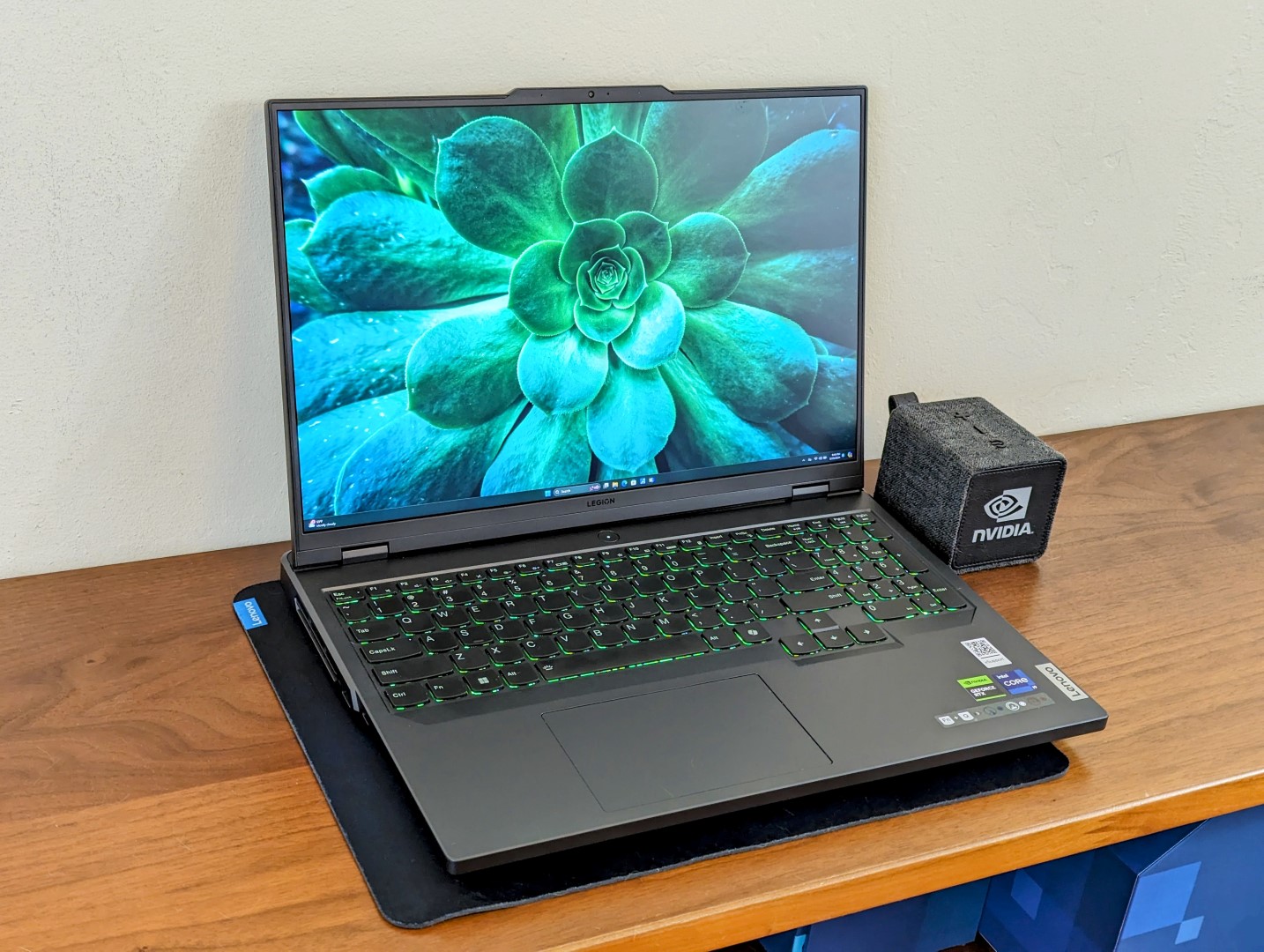
The Lenovo Legion Pro 5 16IRX9 laptop has been making waves in the gaming community, and for good reason. It boasts an impressive lineup of specs, featuring the powerful Intel Core i9-14900HX processor coupled with the NVIDIA GeForce RTX 4070 Laptop GPU. On paper, this combination positions it as a strong contender against some of the most heavyweight gaming laptops on the market.
When it comes to performance, the Legion Pro 5 16IRX9 stands out for its raw computational power. Testing against similar models like the Alienware m16 R1 AMD and Alienware m16 R2 shows that this Lenovo laptop can hold its own, managing impressive frames per second (fps) in various gaming benchmarks. Users can expect a smooth and immersive gaming experience even on demanding titles. Furthermore, the Lenovo Legion Pro 5 16IRX9 outperforms laptops equipped with NVIDIA’s RTX 3050 and RTX 4050 GPUs, showcasing the leap in performance that higher-tier NVIDIA GPUs provide.
However, it’s not just all about gaming. The Legion Pro 5 16IRX9’s robust performance also makes it a solid choice for creative professionals who require a machine capable of handling intensive tasks like video editing, 3D rendering, and other heavy computational applications.
Despite its promising performance metrics, one aspect to consider is the laptop’s weight. The Lenovo Legion Pro 5 16IRX9 is slightly on the heavier side, which might not be ideal for individuals who prioritise portability in a gaming laptop. Those who frequently travel with their devices may find the additional weight to be a minor inconvenience.
On the other hand, the heft of the Legion Pro 5 may be attributed to its build quality and cooling system, which are essential for maintaining performance during extended gaming or work sessions. A sturdy build often translates to better longevity, and a well-designed cooling system ensures the hardware operates within optimal temperature ranges to prevent thermal throttling, which can be a critical factor in performance.
Whether you’re a hardcore gamer or a professional in need of a powerful computing solution, the Legion Pro 5 16IRX9 is a machine that can deliver the performance you need. While its weight may deter some potential buyers, for those who are ready to embrace its solid build, the Legion Pro 5 16IRX9 presents an opportunity to experience top-tier gaming and computing without compromise.
In summary, the Lenovo Legion Pro 5 16IRX9’s combination of high-performing CPU and GPU, good build quality, and effective thermal management make it a serious competitor in the high-performance laptop market. While evaluating your options for a new gaming or work laptop, consider the balance between performance, build quality, and portability to find the best fit for your individual needs and lifestyle.### Understanding the Performance of NVIDIA GeForce RTX 4070 Ti in Gaming Laptops
When it comes to gaming laptops, graphics performance is crucial for an immersive experience. The NVIDIA GeForce RTX 4070 Ti has been a topic of interest among gaming enthusiasts looking to upgrade their setups. Here, we detail some insights into its performance out in the market.
#### Assessing the GeForce RTX 4070 Ti Across Different Laptops
The NVIDIA GeForce RTX 4070 Ti is designed to deliver high-end gaming performance. Laptops equipped with this GPU, such as the Lenovo Legion series and the HP Pavilion Plus, showcase its capabilities across various gaming benchmarks.
Lenovo Legion laptops, known for their gaming prowess, show promising performance when powered by the RTX 4070 Ti. This GPU provides gaming at high frame rates even on the most demanding settings, leading to smooth and visually stunning gameplay.
It is important to consider that the overall performance is also influenced by other components, such as the CPU and system RAM. For example, laptops with Intel Core i9 processors, such as the Lenovo Legion 9 16IRX8, tend to perform at the top of the benchmark rankings, indicating that pairing the RTX 4070 Ti with a powerful processor leads to an optimal gaming experience.
#### Comparing Frame Rates and Gaming Efficiency
Frame rates are a core performance indicator for any graphics card. Higher frame rates generally mean smoother game visuals, which is particularly crucial in fast-paced or competitive gaming scenarios. On frames-per-second (FPS) metrics, laptops with the GeForce RTX 4070 Ti have shown to maintain high FPS, suggesting robust performance for a multitude of games.
The efficiency of a gaming laptop can be evaluated by measuring the FPS against the time taken for the GPU to render the frames (minimized rendering time). Here, the RTX 4070 Ti has demonstrated a solid balance between high-quality visuals and efficient render times.
#### Impact of Different GPUs on Laptop Performance
Different GPUs can vastly affect the performance of a laptop. For those seeking lighter gaming or who have budget constraints, the GeForce RTX 4050 or RTX 3050 might be considered. However, the lower-tier GPUs result in significantly reduced frame rates compared to the RTX 4070 Ti, affirming the superiority of the RTX 4070 Ti for those who prioritize top-notch gaming experiences.
#### Practical Advise for Potential Buyers
For users looking to purchase a new gaming laptop with the NVIDIA GeForce RTX 4070 Ti, consider the following:
– Assess the types of games you plan to play and the performance requirements for these games.
– Look for laptops that offer a harmonious balance of high-performing CPUs and sufficient RAM to complement the RTX 4070 Ti.
– Critical system cooling is necessary for maintaining performance, so consider laptops with advanced cooling systems.
#### Trends and Data Insights
Recent trends have shown an increasing demand for laptops that can handle gaming, content creation, and virtual reality applications without compromise. The GeForce RTX 4070 Ti is well-poised to meet these demands with its performance metrics.
New perspectives can be gained by observing how these GPUs perform in real-world scenarios. Benchmarking across different systems and configurations gives a clearer picture of what to expect in terms of gaming performance and can help guide purchasing decisions.
#### Applying This Information
Understanding the capabilities of the NVIDIA GeForce RTX 4070 Ti can assist consumers in making informed decisions when selecting their next gaming laptop. The performance data indicates that this GPU is a solid choice for those who require robust gaming capabilities in a portable form factor.
Additionally, keeping abreast of the latest trends, such as the incorporation of AI-driven technologies in NVIDIA’s GPUs for enhanced gaming immersion and efficiency, can inform users about the future trajectory of gaming hardware and inspire them to stay ahead in the technology curve.
Incorporating the RTX 4070 Ti into your gaming setup means preparing for future game releases that demand more graphical power, ensuring a gaming laptop that remains relevant and competitive in the fast-evolving gaming landscape.When diving into the world of high-performance laptops, particularly for gaming or demanding professional applications, it’s vital to consider the appropriate hardware configurations. In recent comparisons, a range of laptops boasting various CPUs and GPUs were evaluated based on their frames per second (fps) performance—a key indicator for gaming capabilities.
Among the standout configurations were laptops equipped with AMD Ryzen 9 series processors and NVIDIA GeForce RTX 4000 series GPUs, showcasing significant gaming prowess. The Lenovo Legion 9 16IRX8, powered by an Intel Core i9-13980HX and an NVIDIA GeForce RTX 4090 Laptop GPU, came out as a top performer in these evaluations, achieving high frame rates indicative of its superior graphics capabilities.
However, this doesn’t rule out the excellent performance of setups like the Legion Pro 5 16IRX9 with an Intel Core i9-14900HX and NVIDIA GeForce RTX 4070 Laptop GPU, and the Alienware m16 R1 AMD featuring an AMD Ryzen 9 7845HX with an NVIDIA GeForce RTX 4080 Laptop GPU. These systems also delivered impressive performance, suitable for the most demanding games and applications.
Mid-range options such as the HP Pavilion Plus 16-ab0456tx powered by an Intel Core i7-13700H and an NVIDIA GeForce RTX 3050 6GB Laptop GPU were also tested, and while they may not achieve the peak performance of the top-tier models, they certainly offer a viable solution for less intensive gaming needs.
The LG Gram 2in1 16, with an Intel Core i7-1360P and Intel Iris Xe Graphics, represents a completely different category, shifting focus towards users who prioritize portability and versatility, rather than top-tier gaming performance, as evidenced by lower fps performance in testing.
For those seeking powerful yet cost-effective alternatives, the Lenovo Legion 5 series offers several models with varying configurations that balance cost and performance. Similarly, the Framework Laptop 16 with an AMD Ryzen 9 7940HS and an AMD Radeon RX 7700S is an interesting mention for those conscious of both performance and modularity in their hardware choices.
It is also noteworthy that Alienware’s offerings, renowned for their gaming excellence, feature both AMD and Intel variants, providing options for different preferences. The Alienware m18 R1 AMD, for instance, combines an AMD Ryzen 9 7945HX with an AMD Radeon RX 7900M to yield competitive gaming performance.
Performance evaluations have led to a widespread understanding that the choice between a laptop with a robust GPU like the NVIDIA GeForce RTX 4070 Ti and one with a more balanced setup depends on the specific needs of the user. Gamers and professionals alike should consider frame rates, resolution settings, and specific software requirements when selecting a laptop. Whether it’s for immersive gameplay or resource-intensive applications, a laptop’s CPU and GPU synergy is crucial for a satisfying user experience.
In summation, robust CPUs like the AMD Ryzen 9 series and top-tier GPUs such as the NVIDIA GeForce RTX 4000 series are key contributors to high fps performance in laptops. However, individual needs may steer some users toward mid-range or specialized options, underscoring the importance of matching a laptop’s specifications with the intended usage to achieve the best balance of performance, portability, and price.When it comes to gaming laptops, enthusiasts and serious gamers often scrutinize performance metrics to determine the best hardware setup for their gaming needs. Performance is typically measured in frames per second (fps), which indicates how smoothly a game runs. In this context, gamers may compare various configurations to find a balanced system that provides high fps without compromising too much on other aspects like portability, battery life, and cost.
In evaluating gaming laptops, it’s crucial to consider the central processing unit (CPU) and the graphics processing unit (GPU) since these components largely determine gaming performance. For instance, laptops with Intel Core processors, such as the i7-13700H, and NVIDIA GeForce RTX series GPUs, like the RTX 4070, are popular choices for high-performance gaming setups.
AMD processors, like the Ryzen 9 series, paired with Radeon RX GPUs, also offer competitive performance. High-end configurations typically include the latest AMD Ryzen 9 CPUs and NVIDIA RTX 4080 or 4090 GPUs, delivering impressive fps rates in demanding games. However, these premium setups often come with a higher price tag.
For those seeking a balance between performance and cost, configurations featuring the NVIDIA GeForce RTX 3070 Ti GPU and AMD Ryzen 7 CPUs can be a good compromise. They offer sufficient gaming power at a more accessible price point compared to the top-of-the-line models.
Gaming laptop performance is not just about the components inside; thermal management and build quality also play a significant role. A laptop that manages heat effectively can maintain higher performance levels for longer periods, which is essential during extended gaming sessions.
When shopping for a gaming laptop, it is recommended to look at a range of benchmarks that cover different types of games and workloads. This gives a more comprehensive picture of a laptop’s capabilities, allowing you to choose a model that performs well across your preferred gaming genres.
In conclusion, choosing the right gaming laptop involves a balance of CPU and GPU power, cooling efficiency, build quality, and price. By comparing different configurations and understanding the trade-offs, gamers can find a system that provides the best gaming experience tailored to their preferences and budget. Keep an eye out for the latest models and benchmarks, as the landscape of gaming laptops is constantly evolving with new technological advancements.With the constant evolution of gaming laptops, enthusiasts and professionals are regularly on the lookout for the latest and most powerful options on the market. Among the top contenders are laptops equipped with NVIDIA’s GeForce RTX 4000 series GPUs and AMD’s Ryzen 7000 series processors, which promise impressive performance for both gaming and creative workflows.
Highly anticipated by gamers, the NVIDIA GeForce RTX 4090 Laptop GPU is paving the way for ultra-performance on-the-go. Several gaming laptop models are taking full advantage of this power. The Lenovo Legion 9 16IRX8, for instance, pairs the RTX 4090 GPU with an Intel Core i9-13980HX, nurturing an environment for peak gaming performance.
Next in line, laptops like the Alienware m16 R1 AMD and Lenovo Legion Pro 5 16IRX9 boast the NVIDIA GeForce RTX 4080 and RTX 4070 Laptop GPUs, respectively. These are equipped with powerful AMD Ryzen 9 7845HX and Intel Core i9-14900HX processors, ensuring that they meet high gaming benchmarks and multitasking needs for users.
For those who are looking for a balance between performance and budget, the NVIDIA GeForce RTX 4060 and RTX 4050 Laptop GPUs provide compelling alternatives. Paired with processors like the Intel Core i7-13700HX, as seen in the Lenovo Legion Pro 5 16IRX8, and AMD Ryzen 5 7645HX, featured in the Lenovo Legion Pro 5 16ARX8, these laptops offer a significant boost in performance for most modern games and productivity tasks.
Moving down the performance ladder but still offering substantial gaming prowess, the NVIDIA GeForce RTX 3070 Ti Laptop GPU remains a popular choice. Paired with processors such as the AMD Ryzen 7 6800H in models like the Lenovo Legion 5 Pro 16ARH7H, it provides users with the power to play demanding games at high settings.
For users who prioritize portability and battery life, integrated options like the Intel Iris Xe Graphics found in the LG Gram 2in1 16 16T90R – G.AA78G, combined with energy-efficient processors like the Intel Core i7-1360P, offer a balance of performance and power efficiency suitable for lighter gaming and everyday productivity.
It’s also worth noting the presence of the AMD Radeon RX 7700S in laptops like the Framework Laptop 16 powered by an AMD Ryzen 9 7940HS. This combination is indicative of AMD’s competitive entry into the high-performance laptop GPU space.
In the lower tiers of the RTX 4000 series, the RTX 4070 Laptop GPU remains impressive, averaging solid performance figures across a range of different laptop models. These metrics show that it can reliably handle intense workloads and gaming scenarios.
For creative professionals who require substantial computing muscle for rendering and video editing, laptops with higher-tier GPUs like the RTX 4070 Ti, when paired with processors such as the AMD Ryzen 9 7950X, provide an appealing package. For example, the KFA2 GeForce RTX 4070 Ti SG model offers a robust platform for such intensive tasks.
The advancing performance segment of gaming laptops creates an environment where users can select a device that aligns closely with their specific needs, whether it be cutting-edge gaming, content creation, or practical everyday use. With such a range of options available on the market, considering the balance between performance, portability, and price is key to finding the perfect gaming laptop.In the realm of high-performance gaming laptops, the specifications and benchmarks for CPUs and GPUs are pivotal for consumers looking to make an informed purchase decision. In recent comparisons and performance tests, a range of processors and graphics cards have been evaluated to provide potential buyers with a clearer picture of what they can expect from their investment.
Starting with the Lenovo Legion 5 16IRX G9, which is powered by an Intel Core i7-14650HX processor and an NVIDIA GeForce RTX 4060 Laptop GPU, it represents a strong option for gaming enthusiasts. This setup has been benchmarked and shows competitive performance in various gaming scenarios.
A step up in the performance hierarchy is found in laptops such as the Lenovo Legion Pro 5 16IRX9, featuring the more robust Intel Core i9-14900HX combined with the NVIDIA GeForce RTX 4070 Laptop GPU. For users seeking even greater performance, the Lenovo Legion 9 16IRX8 offers a top-tier Intel Core i9-13980HX CPU and the NVIDIA GeForce RTX 4090 Laptop GPU, which delivers outstanding frame rates even in the most demanding games.
The AMD offerings are also noteworthy, with the Alienware m18 R1 AMD equipped with an AMD Ryzen 9 7945HX and an AMD Radeon RX 7900M GPU. This combination provides an excellent balance of power and energy efficiency, catering to users who favor AMD’s latest architectural enhancements.
For those who value the portability of their gaming rig, the LG Gram 2-in-1 16 features an Intel Core i7-1360P and Intel Iris Xe Graphics G7 96EUs. It offers a viable option for casual gamers and those who need a laptop for everyday productivity with some light gaming on the side.
The HP Pavilion Plus 16-ab0456tx, which sports an Intel Core i7-13700H coupled with an NVIDIA GeForce RTX 3050 6GB Laptop GPU, stands as a solid mid-range choice, balancing cost with performance for mainstream gaming.
High frame rates are a critical metric for gaming performance, and the KFA2 GeForce RTX 4070 Ti SG pushes the envelope with an AMD Ryzen 9 7950X processor and NVIDIA GeForce RTX 4070 Ti graphics. This configuration is particularly suitable for hardcore gamers and content creators demanding peak performance from their systems.
In terms of overall GPU performance, the NVIDIA GeForce RTX 4070 Laptop GPU shows an impressive range of frame rates across different configurations and manufacturers, indicating its versatility and reliability as a high-end graphics solution for portable gaming.
When evaluating such laptops, it’s essential to consider not only the raw performance metrics, such as frame rates, but also other factors like thermal management, display quality, battery life, build quality, and the presence of additional features like high-refresh-rate screens or customizable RGB lighting.
In conclusion, the options on the market today cater to a wide range of preferences and budgets. Whether one is looking for raw power, portability, or a balance of both, there is a high-performance gaming laptop configuration available to meet those specific needs. When choosing the ideal gaming laptop, it’s essential to consider the individual performance characteristics of both the CPU and GPU, alongside other factors, to determine the best fit for personal gaming requirements and lifestyle.When considering the purchase of a gaming laptop, performance is a crucial aspect to evaluate, particularly the frame rate (fps) you can expect from various models and configurations. Frame rate influences the smoothness and responsiveness of the gaming experience, with higher fps generally providing a more seamless visual display.
Let’s delve into the details of gaming laptop performance with various hardware configurations:
– The **HP Pavilion Plus 16-ab0456tx** equipped with an Intel Core i7-13700H and NVIDIA GeForce RTX 3050 6GB Laptop GPU delivers a varied frame rate depending on the gaming scenario, ranging from a low of 29 fps up to 109.5 fps at its peak, which indicates a capacity for casual gaming but may struggle with more demanding titles at higher settings.
– Systems like the **Lenovo Legion 9 16IRX8**, featuring the top-tier Intel Core i9-13980HX coupled with an NVIDIA GeForce RTX 4090 Laptop GPU, show impressive performance figures with fps reaching as high as 142.5. This setup is suitable for hardcore gamers who demand ultra-high-definition gaming experiences without compromises.
– Alienware’s offerings, specifically the **m16 R1** and **m18 R1** with AMD processors and NVIDIA RTX 4080 and Radeon RX 7900M respectively, also showcase strong performance. These machines provide frame rates upwards of 124.2 fps and 102.8 fps, marking them as excellent choices for enthusiasts looking for powerful gaming rigs.
– The **Lenovo Legion Pro 5** iterations with Intel i9-14900HX and Core i7 processors paired with RTX 4070 and RTX 4060 Laptop GPUs deliver a balance between performance and portability with fps figures floating around 102.8 and 71.4, respectively. They are good all-rounders catering to gamers who need mobility along with good performance.
– For those leaning towards versatility and upgradeability, the **Framework Laptop 16** might strike a chord, albeit with lower frame rate outputs (47.7 fps) due to its pairing of an AMD Ryzen 9 7940HS and AMD Radeon RX 7700S—a combination geared more towards productivity with some gaming capabilities.
– AMD’s configurations, like those in some Alienware models, show the brand can compete in gaming laptops, with its CPUs working effectively alongside both NVIDIA and AMD GPUs, showing a varied performance spectrum from 69.3 fps to 90.9 fps, emphasizing the impact of selecting a higher-end GPU for gaming.
In terms of applying this information, it’s key for users to consider their gaming needs and preferences. For high-end game titles at maximum settings, opting for laptops with NVIDIA GeForce RTX 4080 or 4090 GPUs will provide the best experience. Those who prefer a balance between performance and cost might find mid-range GPUs like the RTX 4070 or 4060 more appropriate. Lastly, casual gamers or those on a budget might find good value in a lower-tier GPU like the RTX 3050, with the understanding that they may need to compromise on game settings and resolution for newer, resource-intensive titles.
Overall, selecting the right gaming laptop requires balancing factors such as budget, desired frame rates, game types, graphical settings, and the potential need for portability. By carefully considering the hardware configurations in relation to performance outputs, gamers can make informed decisions to match their personal gaming style and expectations.