MacBook Pro User Avoids $700 Display Repair With a Clever Dual-Mac Setup
A cracked or broken MacBook Pro display can quickly turn into one of the most expensive repairs an Apple laptop owner will face. For many users, the price is high enough that they simply keep using the lower half of the MacBook and connect it to an external monitor instead of paying for a full screen replacement.
One MacBook Pro owner, however, found a much more unusual workaround.
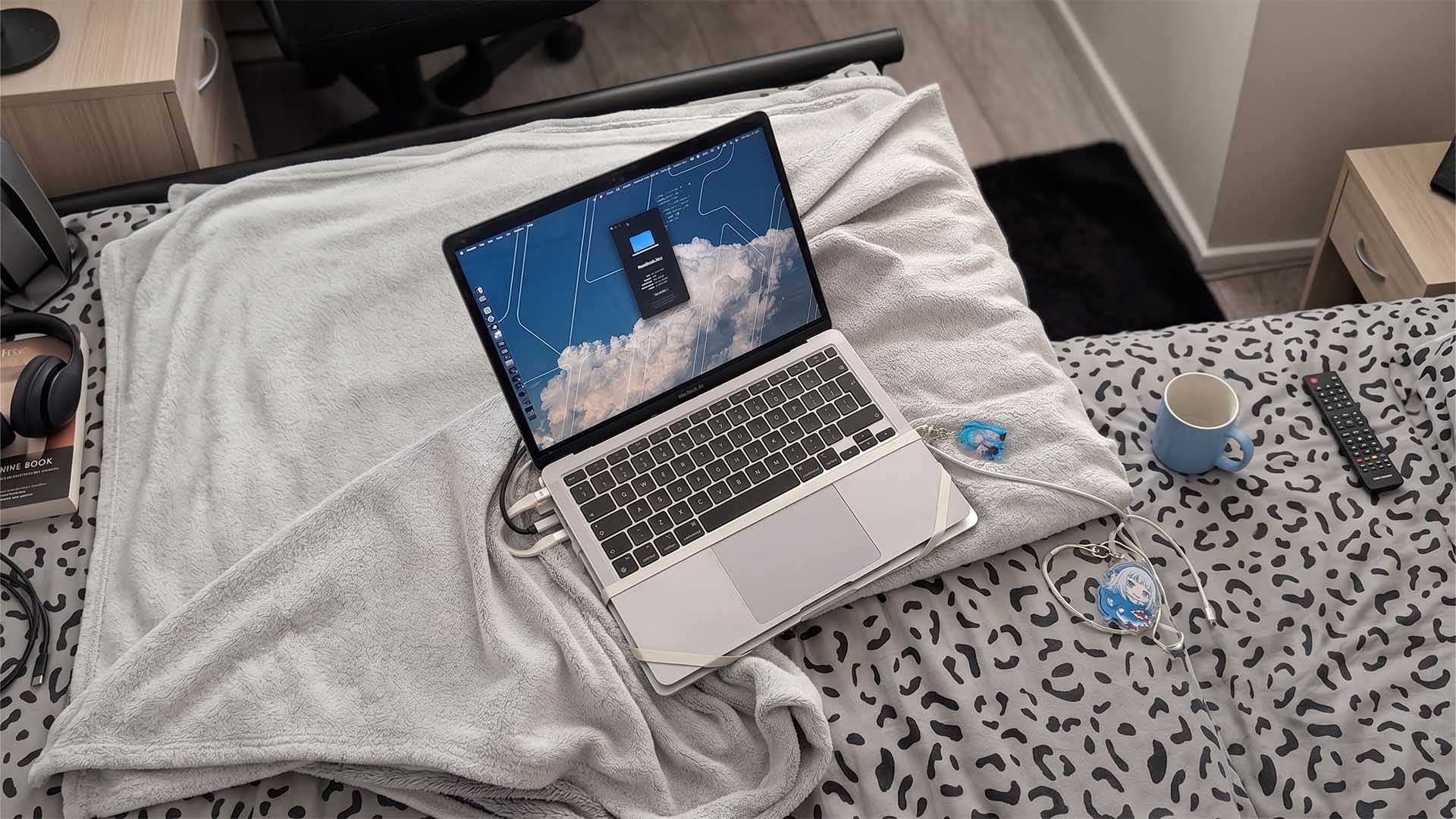
After facing an estimated $700 repair cost for a damaged M4 MacBook Pro display, a Reddit user decided not to replace the screen right away. Instead, they used an older M1 MacBook Pro as a live display for the newer machine, creating a strange but functional two-Mac laptop setup held together with rubber bands.
The result is a headless M4 MacBook Pro using the working screen of an M1 MacBook Pro as its monitor.
How the dual-MacBook setup works
The setup combines both hardware and software to make the older MacBook Pro act like a near-instant external display.
The user strapped the two MacBook Pro units together with rubber bands, placing the M4 MacBook Pro’s keyboard and trackpad section on top. Since the M4 machine still works perfectly apart from its damaged screen, it remains the main computer.
To connect the two Macs, the user relied on a Thunderbolt LAN connection through a cable plugged into the USB-C ports. This helps create a fast local connection between both laptops, keeping latency extremely low.
For the display streaming part, the user ran Moonlight, a low-latency remote display streaming tool. With this combination, the M1 MacBook Pro’s working display becomes a live monitor for the M4 MacBook Pro.
In everyday terms, the older MacBook becomes the screen, while the newer M4 MacBook Pro continues to provide the performance.
A creative way to avoid an expensive MacBook screen repair
Apple’s MacBook Pro models are known for their premium build quality, strong performance, and excellent displays. But when those displays break, repairs can be painfully expensive, especially for newer models.
Unless a user has the skill and confidence to source parts and repair the laptop themselves, an official display replacement can cost hundreds of dollars. In this case, the estimated $700 bill pushed the owner to experiment with a cheaper temporary solution.
Since they already had an older M1 MacBook Pro sitting unused, it became the perfect candidate for the project.
The setup is not exactly elegant, but it is practical. It allows the owner to keep using the powerful M4 MacBook Pro without immediately paying for a replacement screen.
The downsides are obvious
As clever as the idea is, it is not the most portable or polished solution.
Carrying two MacBook Pro units strapped together adds extra weight and bulk. It may work well at a desk, but taking it to a coffee shop, classroom, or office could be awkward. The rubber-band design also makes it look more like a tech experiment than a finished product.
There are also networking considerations. If someone wants to use a similar setup outside the home, they may need additional tools to keep the remote display connection working smoothly when away from the local network.
Still, for users who already have a spare MacBook, this kind of workaround can buy time before paying for a proper repair.
A reminder of how versatile older MacBooks can be
This unusual MacBook Pro repair workaround shows how useful older Apple laptops can remain, even after they are no longer a person’s main computer.
Instead of letting the M1 MacBook Pro collect dust, the owner turned it into a functional display for a newer and more powerful M4 MacBook Pro. It is not a solution most people would choose permanently, but it is a smart example of making the most out of existing hardware.
For anyone dealing with a broken MacBook Pro screen, the traditional options are still the most practical: pay for a display replacement, use an external monitor, or attempt a repair if skilled enough. But this creative dual-Mac setup proves there is sometimes another way, especially for users willing to experiment.
And if nothing else, it saves that $700 repair bill until the owner is ready to replace the display properly.


