Apple’s MacBook Pro storage upgrades have become painfully expensive, and the latest pricing has pushed many power users to look for alternatives. Moving from a 2TB SSD to an 8TB SSD on Apple’s newest high-end MacBook Pro configurations can add around $3,000 to the final price. That is a massive premium for storage, especially at a time when rising demand for memory and flash chips has already made upgrades more costly across the tech industry.
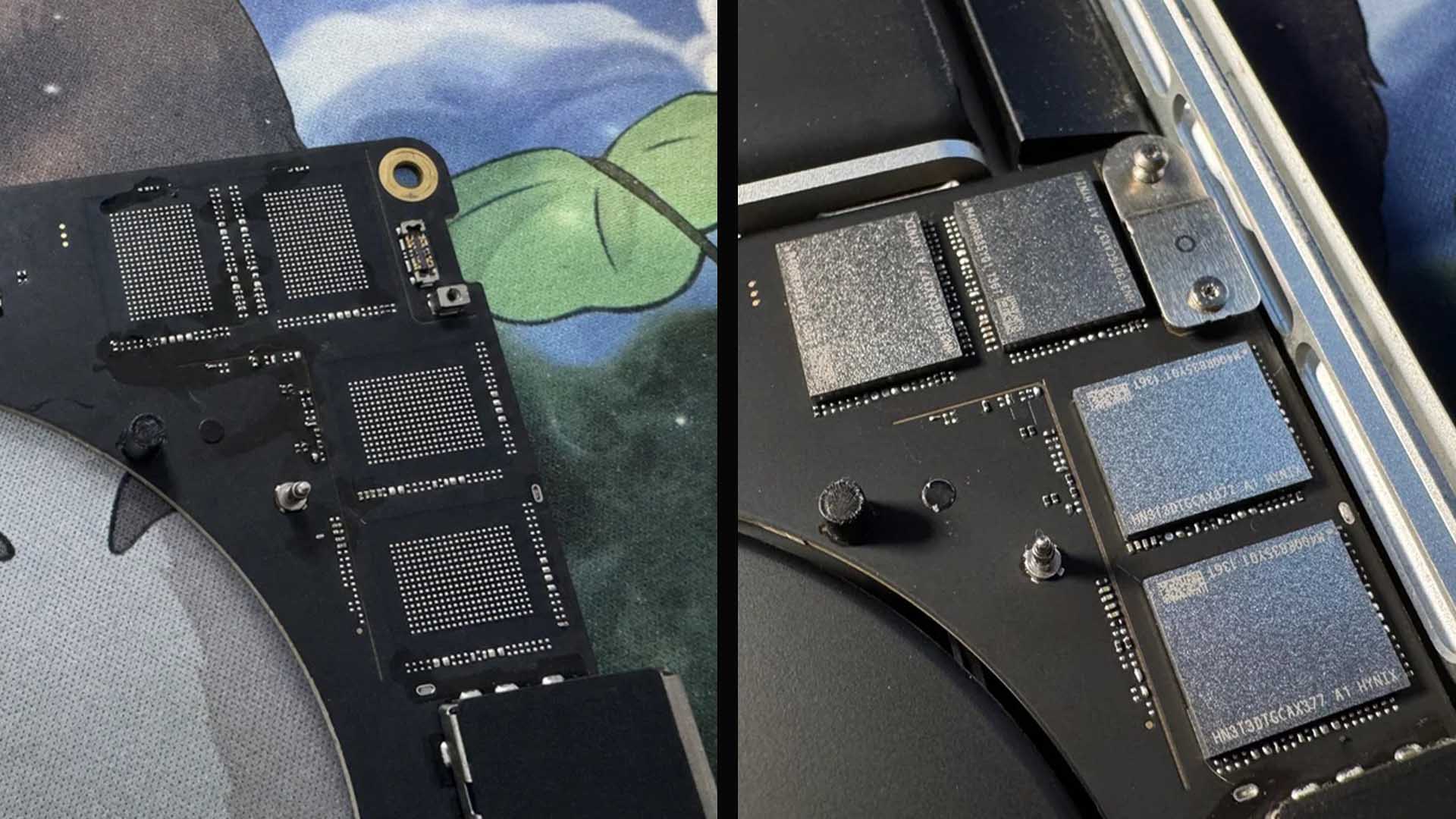
But one skilled hardware modder has shown that there is another path, at least for those with serious electronics experience. A Reddit user known as “arduinoRPi4” successfully upgraded an M4 Max MacBook Pro to 8TB of internal SSD storage by replacing the NAND flash chips. The result is impressive, but the process is so complex and risky that most MacBook Pro owners should not attempt it.
The modder reportedly spent about $800 on the required 8TB NAND package, which is far less than Apple’s official upgrade cost. On paper, that sounds like a major saving. In reality, the upgrade demands advanced micro-soldering skills, specialized tools, and the confidence to work on one of Apple’s most expensive laptops with no room for error.
According to the modder, the job took roughly 12 hours to complete. It required a hot air rework station, microscope soldering, BGA stencil work, and reballing. This is not a simple SSD swap like older laptops used to offer. Modern MacBook Pro storage is soldered directly to the logic board, making any upgrade a delicate board-level repair job.
One of the biggest challenges is finding the correct NAND chips. Not all flash storage packages will work with Apple’s machines, and compatible components can be difficult and expensive to source. Even after securing the right parts, the work does not end with soldering the new NAND chips in place.
For smaller upgrades, such as moving to 2TB, the process may be more manageable for someone with solid soldering experience. However, upgrading to 8TB is much more complicated because additional power-related components may need to be added or modified. These tiny parts are difficult to identify, hard to source, and extremely easy to damage during installation.
The modder warned that nobody should try this kind of MacBook Pro SSD upgrade without at least two to three years of electronics experience. Even then, success is not guaranteed. The smallest mistake could permanently damage the logic board and leave the MacBook Pro unusable.
Another major issue is reverse engineering. Detailed schematics and datasheets for the required power components are not always easy to find, meaning the person performing the upgrade may need to study the board and work out the necessary changes independently. That adds another layer of difficulty beyond the soldering itself.
The goal is not only to install the NAND chips, but also to make macOS recognize the upgraded storage correctly, as if it were a factory-installed configuration. That means the surrounding hardware must be configured properly. If the power components are wrong or the soldering is imperfect, the system may fail to boot or may not detect the storage.
The most difficult part of the project, according to the engineer behind the mod, was dealing with those tiny power components. There are many of them, and each must be placed correctly. This is the kind of work normally handled by experienced board repair technicians, not average laptop users.
The successful 8TB MacBook Pro SSD upgrade is still an exciting example of what is possible. It proves that Apple’s soldered storage can be upgraded under the right conditions, and it highlights how large the gap is between component cost and official upgrade pricing. Spending $800 on parts instead of paying a $3,000 upgrade fee is an attractive idea, especially for professionals who need huge internal storage for video editing, software development, 3D work, or large creative projects.
However, the risk is equally large. A failed attempt could destroy a MacBook Pro that costs thousands of dollars. It may also create warranty complications, and AppleCare+ is unlikely to help if the damage is caused by an unauthorized hardware modification.
For most users, the safer choices are still external SSDs, cloud storage, or paying for the desired internal capacity at the time of purchase. External Thunderbolt SSDs can offer excellent performance for large media libraries and professional workloads, though they are not as convenient as built-in storage.
This MacBook Pro 8TB SSD mod is best viewed as a remarkable technical achievement rather than a practical upgrade path for everyday owners. It shows what is possible in the hands of a highly skilled technician, but it also underlines why Apple’s soldered storage design remains controversial. Users who want more flexibility continue to face a tough decision: pay Apple’s premium upfront, rely on external drives, or take a risky route that requires expert-level hardware repair skills.
In short, the modder saved a significant amount of money compared to Apple’s official storage pricing, but the upgrade was difficult, time-consuming, and dangerous for the machine. Anyone considering a similar MacBook Pro SSD upgrade should think carefully and only trust the job to someone with proven micro-soldering experience. For everyone else, this is one of those projects that is fascinating to read about, but probably best not attempted at home.