Ultimate Thunderbolt 5 Dock Adds a 5-Inch Touchscreen, 10GbE, and NVMe Slot for Power Users
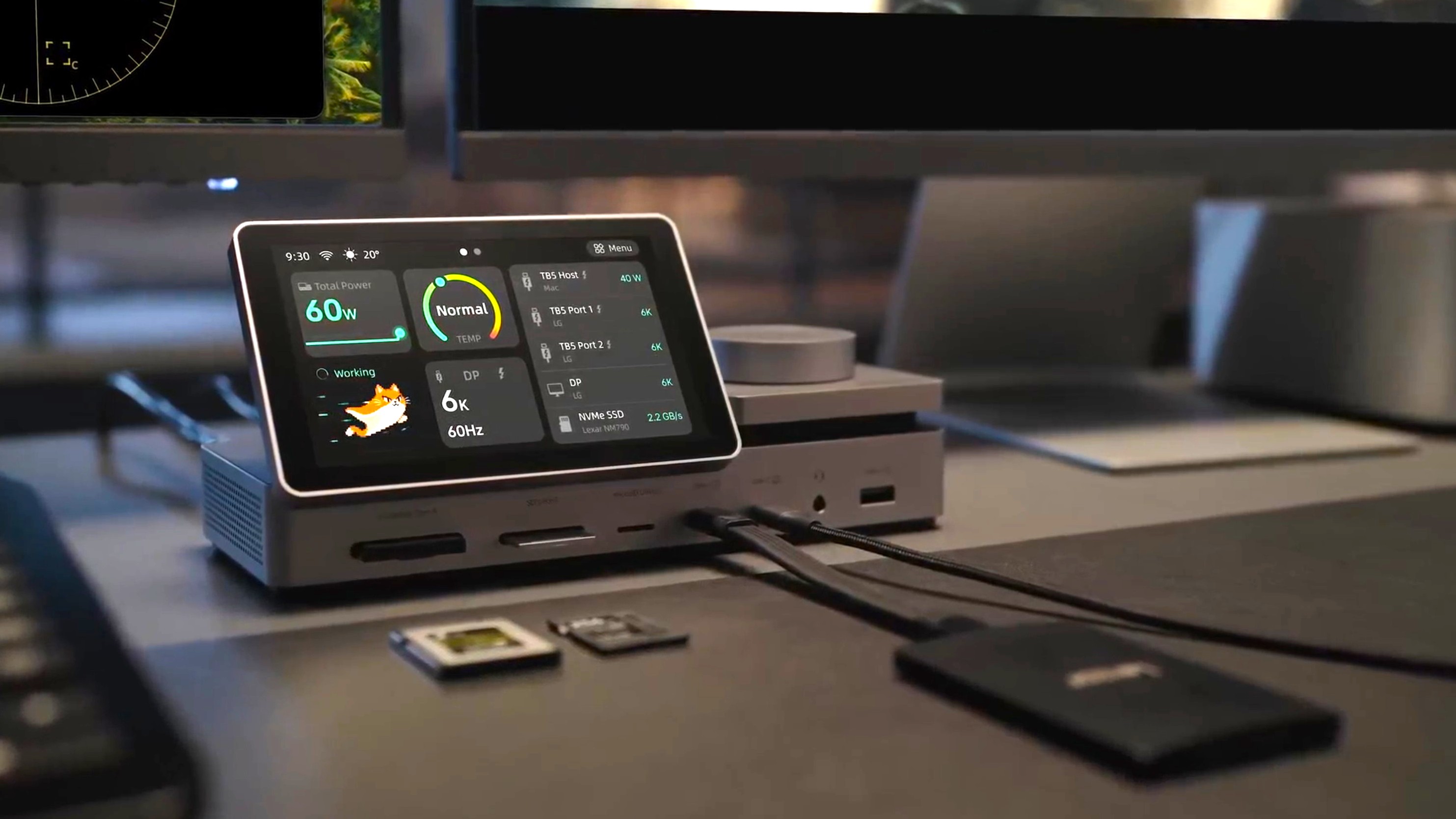
A new Thunderbolt 5 dock is taking desktop connectivity to another level by adding something most docking stations do not offer: a built-in 5-inch touchscreen dashboard. Instead of simply connecting devices in the background, this dock gives users a clear, real-time view of what is happening across their workspace.
The touchscreen acts as a central control panel, showing which devices are currently connected, how much power is being used, and where data is being transferred. It can also display transfer speeds, making it easier to monitor large file copies, external storage activity, and connected peripherals without relying only on software tools.
For creators, professionals, and anyone working with high-speed external drives, this kind of visibility can be extremely useful. Thunderbolt 5 is designed for demanding setups, including multi-display workstations, fast storage devices, and high-bandwidth accessories. Having a built-in display that shows connection and data activity makes the dock feel more like a smart desktop hub than a simple expansion box.
Another standout feature is active cooling. High-performance docks can generate heat, especially when handling multiple displays, fast networking, power delivery, and storage transfers at the same time. This model tracks its temperature, allowing users to keep an eye on thermal performance during heavier workloads.
The dock also includes a rotary dial, adding a more hands-on way to control certain functions. For example, it may be used to switch between display modes or connected screens, making it easier to manage a multi-monitor setup. This small physical control could be especially convenient for users who regularly switch between different workflows.
With support for 10GbE networking and an NVMe slot, the dock appears built for serious productivity. A 10GbE connection can be a major advantage for users working with network storage, large media files, backups, or professional data workflows. Meanwhile, an NVMe slot gives users the option to add high-speed storage directly through the dock, reducing desk clutter and improving convenience.
Overall, this Thunderbolt 5 dock stands out because it combines high-speed connectivity with live system monitoring and physical controls. The 5-inch touchscreen is not just a visual gimmick; it offers practical information about connected devices, power usage, data movement, and temperature. For users who want a cleaner, smarter, and more powerful desktop setup, this dock could be one of the more interesting Thunderbolt 5 accessories to watch.