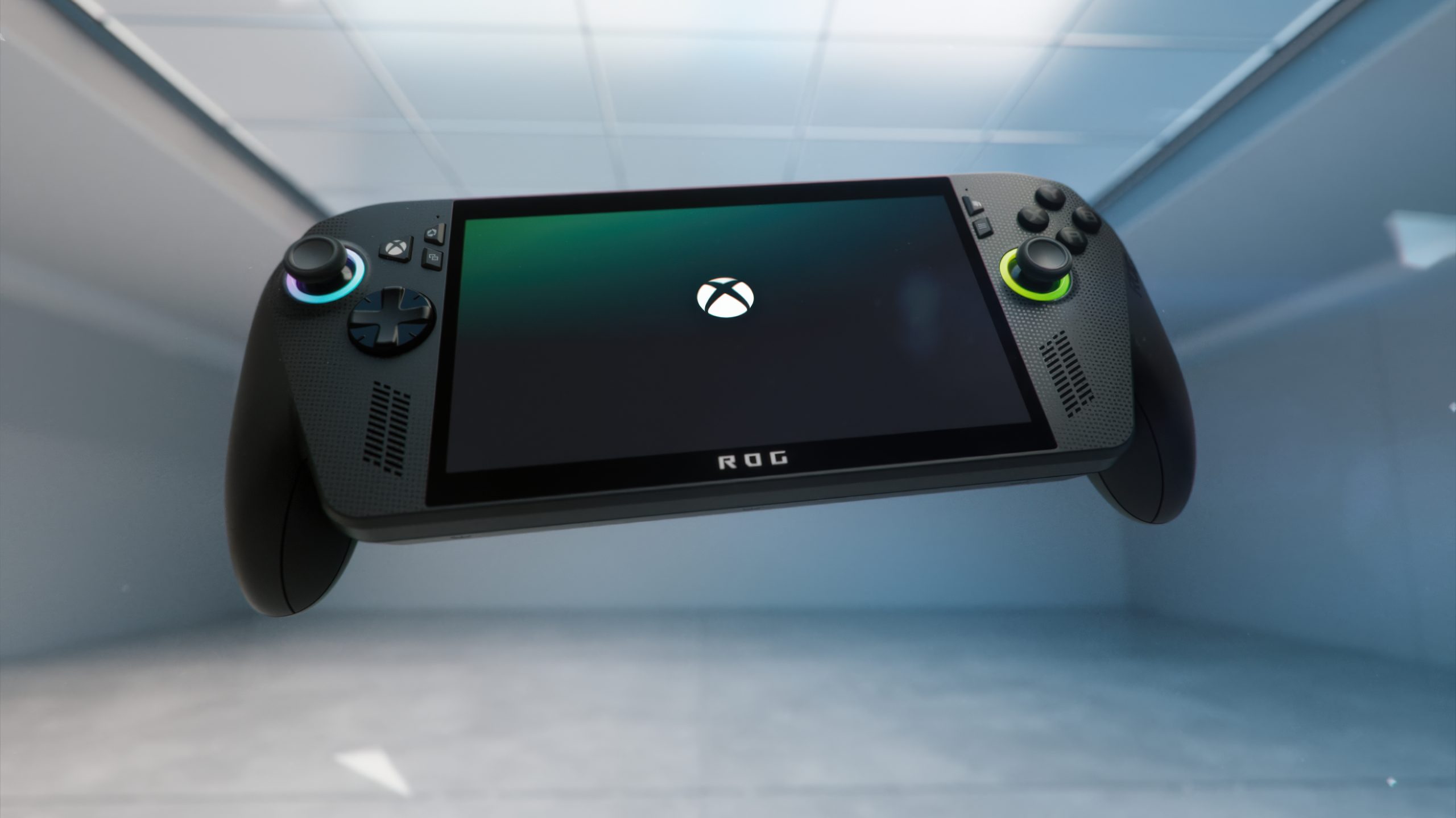
ASUS ROG Xbox Ally X review: powerful, portable, and surprisingly polarizing
Product type: PC gaming handheld
Price: $999 USD ($1299 CAD)
Release: October 16, 2025
I grew up with handhelds. Before consoles took over my living room, I was hunched over a Game Boy and later a Game Boy Advance SP, squeezing in every minute of play wherever I could. On paper, I should be the perfect candidate for a device like the ASUS ROG Xbox Ally X. That’s why my initial reaction shocked me: I found it oddly off-putting at first glance. After three weeks with the unit ASUS sent for review, that knee-jerk reaction has softened, but it hasn’t disappeared entirely.
If you’ve already lived with a modern PC handheld, the novelty may have worn off. For me, the appeal clicked only after carrying this thing around and booting up games I wouldn’t have imagined playing on a portable just a few years ago. The Ally X is impressive and, for some players, absolutely worth owning. For others, even with $999 to spend, I’d be cautious.
Design, feel, and that first impression
Out of the box, the design didn’t win me over. Head-on, it gives off “controller with a screen stuck in the middle” vibes. I wouldn’t call it ugly, but it isn’t exactly sleek. The controller-style grips, though, are a win in practice. At 715g, the ROG Xbox Ally X sits comfortably in hand for long sessions, and the thicker grips help more than you might expect. Battery life holds up well even in the Turbo 25W mode, and if you plug in the included 65W charger, it can boost to a 35W “Turbo-Turbo” mode.
In the box, you’ll find the charger, the usual paperwork, and a small cardboard stand. Setup on my unit took longer than retail buyers should expect due to pre-release updates, but once configured, it’s clear what ASUS is aiming for. There’s an Xbox button on the side, it boots into the redesigned Xbox PC app UI, and the whole software experience is geared toward feeling console-like. Still, let’s be clear: this is not an Xbox. It’s a Windows 11 handheld with an Xbox-flavored front end. The fingerprint reader built into the power button is a small but excellent touch that makes hopping back in fast and frictionless.
Controls and ergonomics
– Back buttons are satisfyingly clicky.
– Thumbsticks are well placed and feel natural.
– Triggers have a smooth pull.
– ABXY buttons feel a touch sticky. Not a deal-breaker, but noticeable.
– The D-pad is genuinely excellent—crisp and reliable, even in demanding platformers.
That D-pad quality matters. I lost hours replaying Celeste, where precision is everything, and it felt fantastic here. I also spent time with Hollow Knight Silksong and found the inputs responsive and consistent.
Where the layout stumbles is up top. Five buttons flank the screen edges—two on one side, three on the other—and it’s at least two too many. The Xbox button and Armoury Crate button both route you to the same kind of menu, which feels redundant, and I repeatedly hit the Library button by accident. Streamlining these would improve the day-to-day experience.
Carrying case add-on
ASUS’s official 2-in-1 hard-shell case does its job well. It’s simple, protective, and the attached velcro pouch for the charger is surprisingly handy. The retention strap inside, however, makes quick in-and-out access a little clumsy.
Performance mindset and battery behavior
The ROG Xbox Ally X emphasizes sustained, comfortable play. Even when running in Turbo 25W, battery life is respectable, and when plugged in it can stretch into that higher-power “Turbo-Turbo” state for a touch more headroom. The real draw here is how cohesive the experience feels when you’re actually playing—quick logins, good ergonomics, a strong D-pad, and a UI that puts your library up front.
Specs snapshot and what’s new
The ROG Xbox Ally X is now the top-end option in the lineup. Its upgrades focus on smarter efficiency, faster memory, and a more console-like chassis rather than raw core count leaps.
– OS: Windows 11 Home
– Processor: AMD Ryzen AI Z2 Extreme, 8c/16t (Zen 5) up to 5.0 GHz boost
– Graphics: RDNA 3.5, 16 CUs up to 2.9 GHz boost
– NPU: Up to 50 TOPS
– Memory: 24GB LPDDR5X-8000
– Storage: 1TB M.2 2280 SSD
– Notable hardware changes vs prior models: improved USB ports, reshaped body with controller-like grips, dedicated Xbox button, faster memory, and a focus on better efficiency rather than simply more cores or brute-force performance.
For context within the Ally family:
– Original ROG Ally (2023): Ryzen Z1, RDNA 3, 16GB LPDDR5-6400, 512GB SSD
– ROG Ally X (2024): Ryzen Z1 Extreme, RDNA 3, 24GB LPDDR5X-7500, 1TB SSD
– ROG Xbox Ally (2025): Ryzen Z2 A, RDNA 2, 16GB LPDDR5-6400, 512GB SSD
– ROG Xbox Ally X (2025): Ryzen AI Z2 Extreme, RDNA 3.5, 24GB LPDDR5X-8000, 1TB SSD
The Xbox-leaning UI refresh launches with the new models and is also rolling out to previous Ally devices, making the ecosystem feel more cohesive if you’re already in it.
Who will love it, and who should skip
Buy it if:
– You want a Windows 11 handheld with a console-like front end and tight Xbox app integration.
– You value comfort, long sessions, and a legitimately great D-pad for platformers and retro titles.
– You want a premium-feeling device with modern AMD silicon, a capable NPU, and fast memory.
Skip it if:
– You already have a solid gaming laptop/desktop plus a console and don’t need another platform.
– You’re sensitive to extra buttons and accidental presses; the top-corner cluster can frustrate.
– You’re chasing pure value over premium ergonomics and Xbox-style UI convenience.
Verdict
The ASUS ROG Xbox Ally X is a confident handheld that gets a lot right: strong ergonomics, a best-in-class D-pad feel, a cleaner, console-like software experience, and meaningful efficiency gains with the Ryzen AI Z2 Extreme platform. It still isn’t the sleekest-looking device, and the redundant top buttons detract from an otherwise thoughtful design. Most importantly, even though it nails the “pick up and play” vibe better than many Windows handhelds, it remains a want—not a need—for most players who already own a capable PC and a current console.
If you’ve been waiting for a premium Windows gaming handheld that leans into the Xbox ecosystem without actually being an Xbox, this is the one to try. If your setup already covers the same ground, think carefully before dropping $999.ASUS ROG Xbox Ally X review: a Windows handheld built for console-first gamers
If you’ve been waiting for a handheld gaming PC that feels familiar to console players but still taps into the freedom of Windows, the ASUS ROG Xbox Ally X should be on your radar. It runs Windows 11 with an Xbox-flavored interface, packs AMD’s Ryzen AI Z2 Extreme, and focuses on battery life and smooth play rather than spec-sheet showboating. It’s not a console, and expecting it to behave exactly like one sets you up for disappointment—but as a portable PC tailored for players who prioritize pick-up-and-play simplicity, it nails a lot of the fundamentals.
Display and design that favor endurance and clarity
ASUS intentionally sticks with a power‑efficient IPS panel instead of OLED to stretch unplugged playtime. The 7-inch FHD (1920 x 1080) 16:9 display reaches up to 500 nits and 120Hz, supports AMD FreeSync variable refresh rate, and is protected by Corning Gorilla Glass Victus with a DXC anti‑reflection coating. The result is sharp, responsive visuals with fewer distracting reflections and smoother motion when frame rates fluctuate.
Connectivity and expansion for serious play
You’re covered for both on-the-go sessions and docked setups. Key ports include:
– ROG XG Mobile interface with a USB 3.2 Type‑C combo/DisplayPort for eGPU expansion
– USB4 Type‑C with DisplayPort 2.1 and Power Delivery 3.0, Thunderbolt compatible
– USB 3.2 Gen 2 Type‑C with DisplayPort 2.1 and Power Delivery 3.0
– UHS‑II microSD card reader (supports SD, SDXC, SDHC; UHS‑I DDR200 mode)
– 3.5 mm combo audio jack
Wireless options include Wi‑Fi 6E (2×2) with Bluetooth 5.2 or 5.4 depending on configuration. Dimensions vary slightly by model, but expect a footprint around 280–291 mm x 113–122 mm x 37–51 mm and a weight between 608 g and 715 g—still very portable for a device this capable.
Battery, power modes, and pricing
You can choose from batteries rated at 40Wh, 60Wh, or 80Wh. After an hour of Red Dead Redemption 2 in Turbo mode, battery dropped to roughly 50%. That’s not mind-blowing, but it’s respectable considering you’re pushing peak performance. The key takeaway: you don’t have to live in Turbo to enjoy great results. The 17W Performance mode handled most of what I played without big compromises, and the 13W Silent mode still kept some larger titles playable.
Lineup pricing spans multiple tiers at $499, $599, $799, and $999 USD.
Real‑world performance and benchmarks
I focused on a blend of visually demanding and well‑optimized games, using built‑in benchmarks where available. Across the board, the device can often hit 30–60 FPS with thoughtful settings, but consistency varies by title. VRR helps smooth the ride.
– Forza Horizon 5: The standout. On High settings, it delivered a consistent, silky 60 FPS, showcasing what the Ally X can do with a well‑optimized game.
– DOOM: The Dark Ages: Even at Low settings, it struggled to hold a solid 60 FPS and didn’t look great. I wouldn’t recommend this one on the Ally X right now.
– Red Dead Redemption 2: On the 17W Performance mode at Ultra, it reliably hovered around 40 FPS; dropping to the 13W Silent mode brought it down to about 30 FPS. For a cinematic open‑world on a handheld, 40 FPS feels surprisingly good.
– Shadow of the Tomb Raider: On High, it landed near 40 FPS in both 17W Performance and Turbo (25W/35W) modes; Silent mode dipped to ~30 FPS but remained playable if you’re comfortable below 60 FPS.
– Horizon Zero Dawn: Similar to Tomb Raider—around 40 FPS in 17W Performance and about 30 FPS in 13W Silent. Switch to Favor Performance and you can flirt with ~50 FPS on 17W while still enjoying strong image quality.
Other games I sampled included God of War (2018), Elden Ring, Dying Light: The Beast, OlliOlli World, and Hell is Us. Elden Ring proved unstable during my sessions, crashing multiple times—sometimes triggered by volume or shoulder buttons, and sometimes mid‑play with no obvious cause. Dying Light: The Beast crashed once transitioning into Old Town. These issues may be software related rather than a hardware limitation, but they’re worth noting.
Why it feels console‑like—but isn’t a console
With Windows 11 under the hood and an Xbox‑centric UI, the Ally X offers a console‑like flow, but this is still a PC handheld. Expect some tinkering, occasional patches, and the variability of PC game optimization. The upside is huge: you can bring your Steam, Epic Games Store, and GOG libraries wherever you go. On the Xbox side, you’ll see a curated view of what you own rather than a complete console library mirror, which is why I call the experience console‑like, not console‑identical.
What stands out most
– You don’t need Turbo to have fun. The 17W Performance mode is the sweet spot for many titles, balancing battery and smooth play.
– The 120Hz, VRR‑equipped IPS screen is bright, sharp, and efficient. OLED would look gorgeous, but the battery trade‑off and cost creep aren’t worth it here.
– Forza Horizon 5 shows best‑case performance; more demanding or less optimized games will need settings tweaks to maintain consistency.
– VRR meaningfully improves perceived smoothness when your FPS hovers around 40–60.
Who should buy it
Pick the ASUS ROG Xbox Ally X if you want a handheld gaming PC that:
– Feels familiar to console players but gives you full Windows flexibility
– Prioritizes battery life and practical performance over buzzword specs
– Plays modern AAA games at 30–60 FPS with smart settings and benefits from VRR smoothing
– Offers top‑tier connectivity, including USB4/DP 2.1, fast UHS‑II storage expansion, and optional eGPU via ROG XG Mobile
Bottom line
The ASUS ROG Xbox Ally X isn’t trying to be a pure console replacement. It’s a portable Windows gaming PC with a streamlined, Xbox‑forward interface that nails the basics: a sharp and speedy 7-inch 120Hz display, strong real‑world performance at sensible power targets, and battery options that actually make long sessions viable. If you’re comfortable with 40–60 FPS targets and occasional PC quirks, it’s one of the most compelling handhelds you can carry today.ASUS ROG Xbox Ally X Review: Powerful, polished, and pricey — but not your whole Xbox library on the go
If you want a handheld that feels like a console without giving up your PC library, the ASUS ROG Xbox Ally X gets a lot right. The new Xbox UI makes navigation feel familiar and fluid, the ergonomics are excellent for long sessions, and at 17W Performance mode, battery efficiency is genuinely impressive. It’s a seriously capable portable gaming PC that can run practically anything in your Windows library and makes cloud or app-based play about as seamless as Windows allows.
But here’s the sticking point: it still doesn’t deliver your entire Xbox library everywhere. Original Xbox and Xbox 360 games that run on a Series X via backward compatibility don’t show up in the Xbox PC app, and some titles available on your console simply aren’t accessible here. So while the experience leans console-like, the library reality is strictly tied to what works through the Xbox PC app and cloud — not everything you own on the console side.
That nuance matters more when you look at the price. At $999, it’s a tough sell. For that kind of money, many players already have a gaming PC, a console, or even another handheld. Portability is the pitch, and this device nails that aspect, but you can get comparable handheld experiences for less — including from ASUS’s own lineup. If you already own a PC gaming handheld, this doesn’t feel like an essential upgrade. If you’re buying your first, you don’t need to jump to the top of the price chart to get smooth performance, comfortable controls, and great games on the go. A cheaper device with a grippy case can get you most of the way there.
None of that takes away from how impressively put together this machine is. The performance is strong, the controls are comfortable, and the Xbox-focused UI work brings clarity to a platform that can easily feel fragmented. Still, Windows quirks and typical PC-gaming hiccups occasionally break the “just play” console illusion, and the premium price makes the value equation hard to swallow when similarly enjoyable experiences are available for less.
Verdict
A fantastic-feeling, highly capable handheld that blends PC flexibility with a slick, console-style interface. It’s arguably one of the best portable PC gaming experiences you can buy today — but it isn’t your full Xbox library on the move, and the $999 price will be a deal-breaker for many.
Pros
– Smooth Xbox UI creates a console-like feel
– Excellent battery efficiency at the 17W Performance setting
– Runs practically any game in your PC library
– Comfortable, well-balanced design for long play sessions
Cons
– Doesn’t actually let you take your entire Xbox library with you
– Windows and PC-gaming quirks can interrupt the “console” experience
– A steep $999 price that’s difficult to justify over cheaper alternatives
Score: 7.5/10
Disclosure: The device was provided by the manufacturer for review purposes.